xAI
xAI removed Companions feature from Grok home screen tab

xAI has once again changed the Grok iOS app home screen, removing the Companions tab, which used to provide easy and efficient access to these 3D AI avatars.
With the recent app update, the companions option has been moved to the left side menu. Last September, xAI shifted the Companions feature on the home screen tab beside “Ask” and “Imagine”.
When the user clicks this tab, it transitions to a dedicated interface with individual companion UIs. It is also used to dynamically change the name of the Companion tab into the selected AI companion, such as Ani.
This is not new since the companions initially resided on the left sidebar. Yet, the current version feels less effective, while it previously used to have AI companions’ thumbnails. So, now you must have to go to companions’ space in order to use them.
Instead, the sidebar now has an icon of a female with twin tails like Ani, followed by the “Companions” label. Once clicked, the user interface transitions into a dedicated mode, which remains unchanged.
The reason for this removal remains unknown, which may be temporary since the xAI team continues to test new UI upgrades with each update.

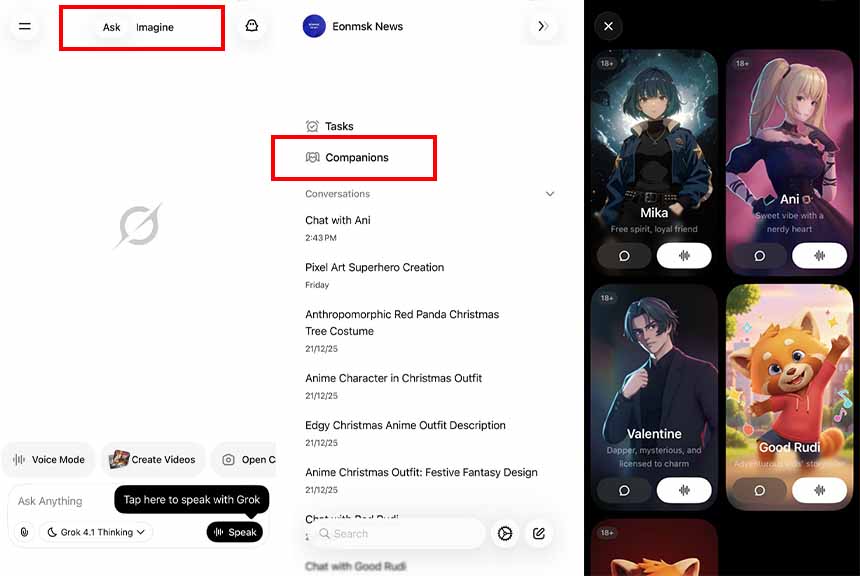
xAI moved the Grok companions feature from the home screen tab to the sidebar menu
Grok Companions
These are 3D avatars with interactive animations powered by the Grok AI model. These models can conduct voice and text chat, while they respond with their pre-defined animations. One of the companions, Ani, is quite popular among users for her lustrious talks and anime-inspired appearance. The app also offers other companions, including Valentine, Mika, and Rudi (good and bad).
These are highly customizable; you can change their tone for a personalized user experience. On the other hand, xAI also releases custom outfits to increase user interest.
The companions feature is currently limited to Grok iOS app users for free, and the Android version rollout is unconfirmed.