Apple
Tesla demonstrates Apple Watch app features through video

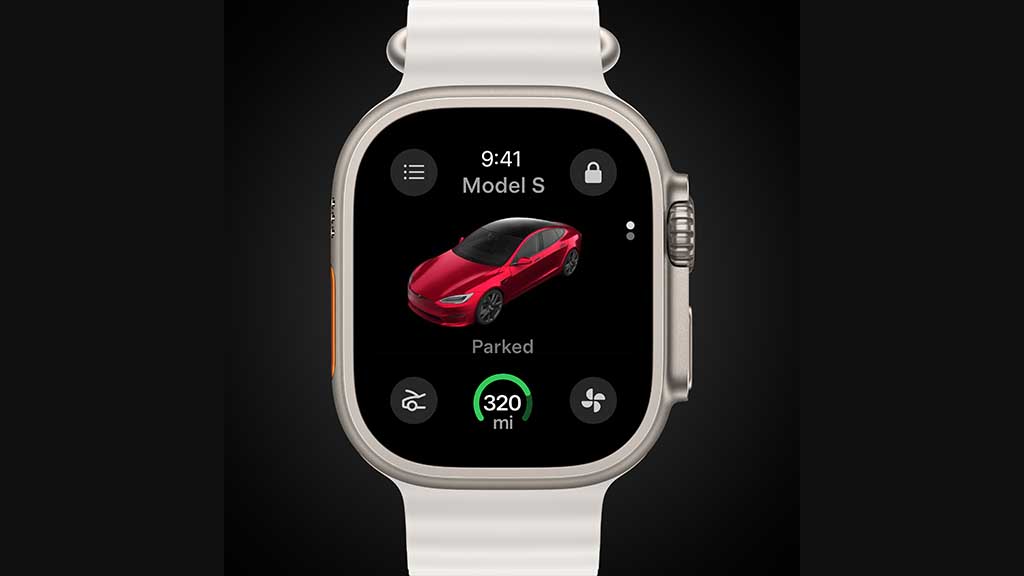
Tesla has published a short video to demonstrate all of the features that its Apple Watch app offers for customers and ease up connectivity with the vehicle.
The app user interface has a typical look including the vehicle avatar and key controls. The video first demonstrates pre-condition with one tap on the bottom right button. It will help you to get your preset temperature inside the cabin before you enter the vehicle.
Next, it shows the frunk opening with the button on the bottom left, one tap is all that is required. Before opening the frunk, the watch will ask for permission to send the command to the vehicle.
The middle has a range indicator and a tap on that will open even more motions including the charging port and flash keys.
You can switch between your Teslas from the menu button on the top left. It will list your vehicles with their available battery levels.
One of the major advantages of this Apple Watch app is that you can use it as a car key. Once enabled, walk up to the vehicle and it will perform an auto-unlock. Check the icon on the top right to see the lock/unlock status.
There are more features and capabilities that you can explore within this Apple Watch app for Tesla vehicles and other products.
Watch this …
You can now use your Apple Watch to unlock your Tesla & remotely send commands, directly from your wrist
Plus, it also serves as your key pic.twitter.com/ks3050SLIA
— Tesla (@Tesla) December 18, 2024