
xAI
xAI will bring workspace feature for Grok conversations

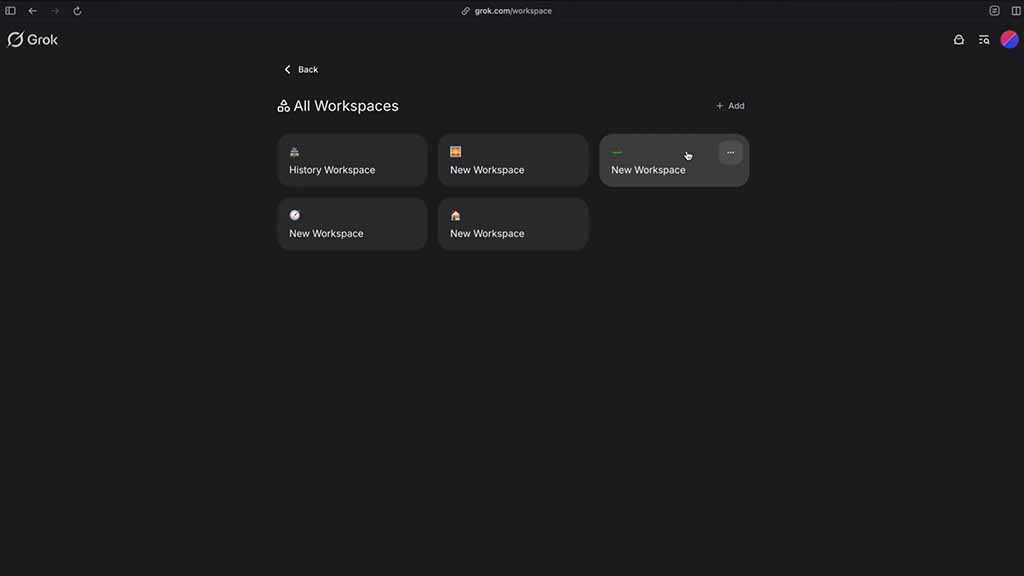
xAI will soon release a new feature called workspace for Grok users, and it will allow users to set a custom conversation environments.
Information coming from TechDevNotes reveals that xAI is testing this capability for the Web version. The feature allows you to create a separate conversation room with custom reply instructions.
The custom tone feature is already available for Grok users in the settings menu, but you can only apply this globally. Compared to that, workspace lets you create new chatrooms, each with a different voice tone.
Grok home will have a dedicated section on the bottom, and here you can see all of the custom workspace shortcuts. Once clicked, Grok will open a dedicated screen with two tabs — Conversation and Instructions.
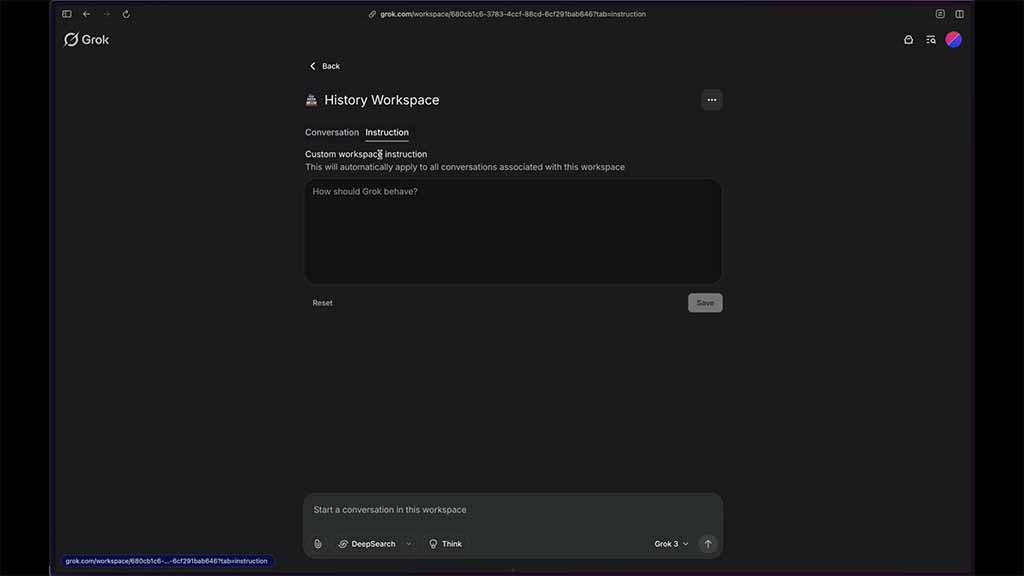
Source – techdevnotes/X
To set up a workspace, you need to enter custom instruction that will apply to all conversations associated with the new workspace. For example, you can enter “Act like a Historian” and all questions in this workspace will be carried with this character.
The workspace will include a prompt box, but you cannot change Grok’s persona due to the custom instruction. The chatbot’s personas will be available via the home screen. xAI is currently testing the workspace feature, and it will soon rollout for all Grok users.





