
xAI
Grok gets Auto mode to select a model by itself according to the question

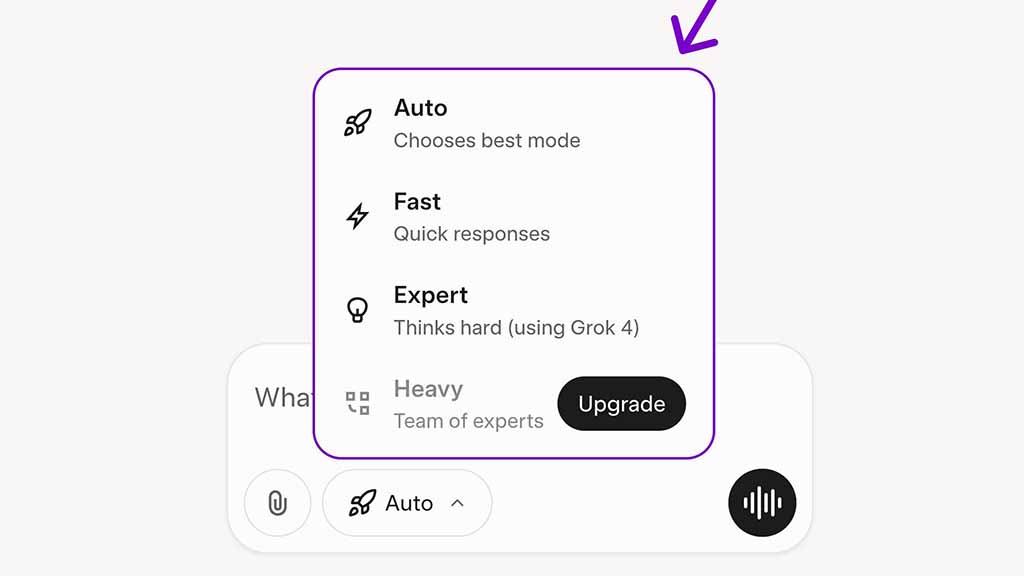
Grok is getting a major feature overhaul with a new auto mode, which will give Grok full control over model selection to answer a question based on a requirement.
Previously, Grok had modes including DeepSearch, DeeperSearch, and Think. These no longer exist in the newest release. Instead, the new mode selection has taken over for good. xAI has brought a unified solution by combining models and thinking methods.
Here are the four modes:
- Auto – Switches model based on the question
- Fast – Replies quick, simple answers for short queries, using Grok 3
- Expert – Uses Grok 4 for detailed, thoughtful answers for complex questions that require deep thinking.
- Heavy – Grok 4 Heavy model deployed for multi-agent thinking and reasoning for highly complex tasks such as coding audits or detailed research. However, it will only be unlocked for SuperGrok Heavy subscribers.
xAI Grok Auto Mode
These options are pretty simplified and provide a sense of intelligence, removing the requirements for manual selection. For example, the Auto mode will decide whether to reply in detail or keep it short and simple, by combining the capabilities of both Grok 3 and Grok 4 collaboratively.
This feature first made its debut on the web version, but it’s also available on the mobile app. If you are using Grok on mobile, make sure to download the latest app update to get new features.





