xAI
How To Change xAI Grok Companion – Ani Outfit

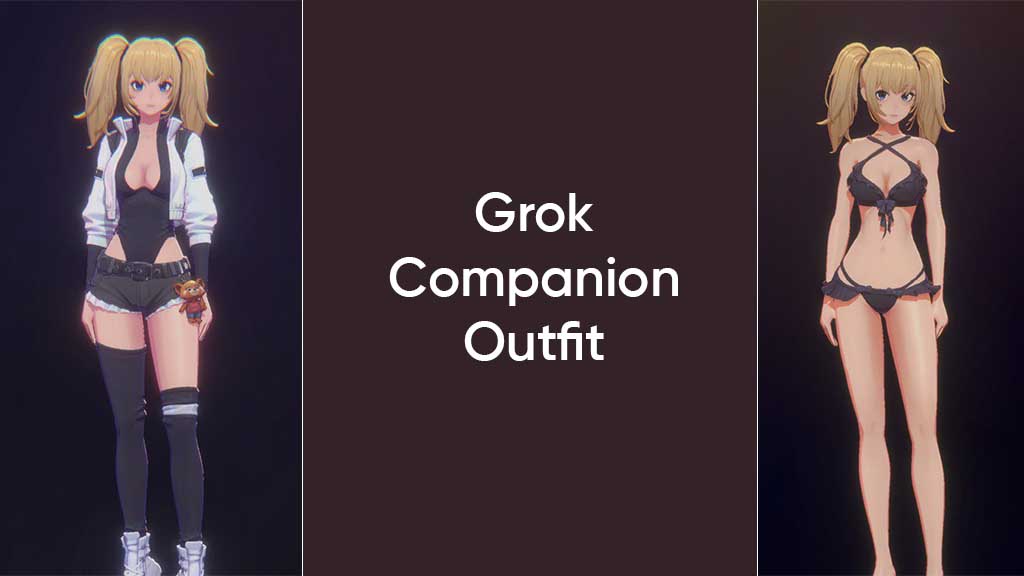
xAI has released new outfits for Grok AI companions, and here’s how you can change the outfit of Ani and Rudi from the app.
Companions are 3D animated avatars hosted within the Grok app, allowing voice and text interactions with the AI model. Unlike any other AI avatar, Grok companions offer a unique experience with interactive animations. For example, Ani is an anime-style female character. She has a stylish look and flirts with the user.
Along with her flirtatious personality, she also has an attractive attire, but initially, Ani had only one outfit, and the same goes for Rudi. Now, xAI has released four new attire for Ani, including Drifter, Pixie, Rabel, and Sunny. These four clothes have different combinations of clothing; for example, Sunny is more revealing, and Drifter is more sporty.
On the other hand, Rudi is getting something entirely new, which suits its explosive persona. An outfit “Rocket” is added to bad Rudi’s wardrobe, and it has a Rambo-like combatant theme, including a rocket launcher and ammo belt.
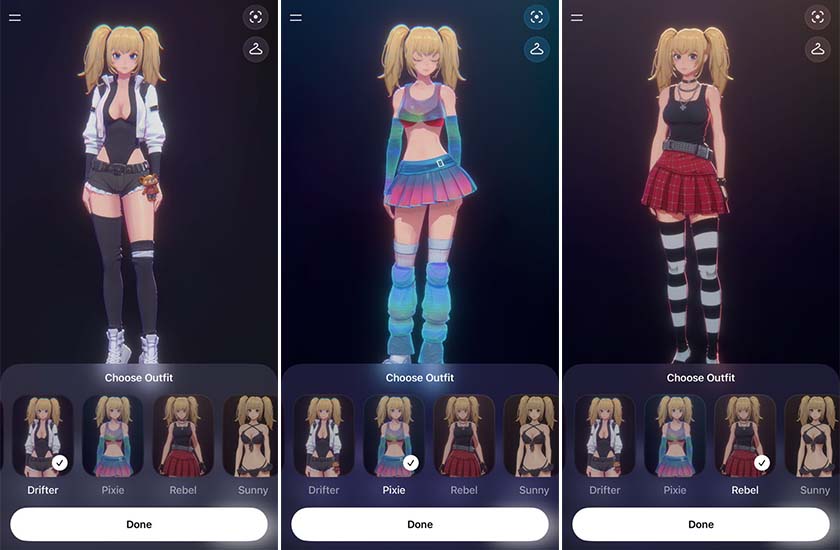
Here’s how to change Grok companions – Ani and Rudi’s outfit
- Download the latest Grok app update from the App Store and launch it.
- Select a companion – Ani from the home screen, toggle on the top of the screen
- Wait for the AI companion to appear on the screen
- Tap on the hanger icon on the top right
- Select an outfit from the pop-up menu on the bottom side
Once changed, Ani and Rudi will save your preference when you next launch the application.
Grok companion feature is currently limited to iOS users, and its Android release is still pending.