Microsoft
Microsoft Copilot app gets Mico animated avatar with a Clippy surprise

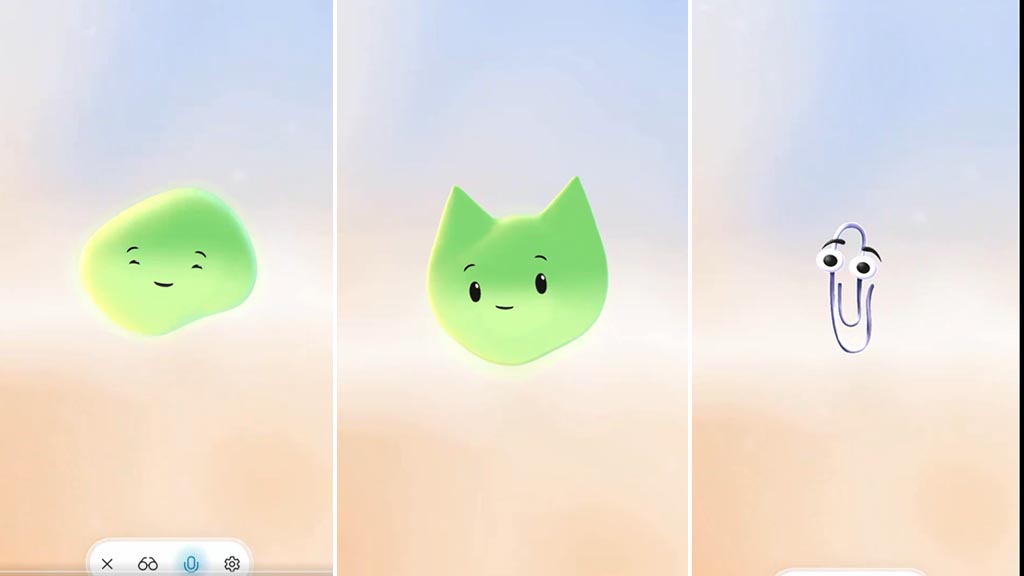
Microsoft has released a new Copilot app update for Android and iOS devices, bringing an Mico animated avatar for an interactive experience.
Micro is a shape-shifter avatar with a gradient background, while its facial expressions are drawn from the eyes and mouth. Mico hovers on the home screen, instead of just showing text in the previous versions. It will react to your prompts and enlarge as soon as you switch to voice mode. There, you will see its full-fledged animations with the lip sync.
On top of that, Microsoft has updated the voice mode UI for Copilot voice mode on iOS. You can tweak Mico’s voice settings as Birch, Rain, Grove, Wave, Canyon, Meadow, Elm, and Alder. Furthermore, Copilot users can turn off the Mico with the slider.
Mico Animated Avatar for Microsoft Copilot
Mico has one major secret: if you tap continuously on this animated avatar, it will change shape and eventually turn into Clippy. For starters, Clippy was an animated paperclip character that acted as an office assistant in earlier versions of Microsoft Office, which was intended to help users with tasks by offering tips and guidance.
CLIPPY IS BACK!!! 🔥
If you tap many times on Mico, it changes shape and eventually turns into Clippy. https://t.co/OuJWABPUNs pic.twitter.com/EzQPCNGwce
— TestingCatalog News 🗞 (@testingcatalog) October 23, 2025
However, Microsoft officially retired Clippy in Office 2007 due to negative user feedback. Though it was available in later versions of the Office, but not installed as the default. It’s great to see that the Copilot maker has given Clippy a secret space in its AI application.